The Curious Case of the DPC
Some months ago I switched my graphics from an NVIDIA 9800GTX+ to a pair of cards: An ATI Radeon 5770 and an ATI Radeon 5750. I did this mainly to mine Bitcoins as I wrote before, but I figured it also gave more video power for multiboxing. I run as many as three clients at once, so this is not a trivial issue.
While mining for bitcoins, I would keep all my clients at low quality settings, and still get good frame rate. In the last month I've stopped mining bitcoins due to lack of interest and the prices going into the toilet. If I'm not using that GPU power to mine, I can crank up the quality settings on my EVE clients. Or can I?
After turning client settings up to medium-high, I started to notice occasional audio crackles and pops in my audio. I bitched about this to Paul for a while before actually doing something about it, of course. My first attempt was to move off my front-panel audio to the rear connectors and assuming EM interference, but this was without improvement. I also double-checked the headphones on another computer to be sure they weren't the problem.
Going back to the issue itself, I lowered the video quality on my EVE clients and the audio issue went away. I also noticed it only happened if I had at least two clients open and if they were in "windowed" mode at near-fullscreen resolution. Smaller windows, using "fullscreen" or "fixed window", made the problem go away. Why was I not using fullscreen? Multiple monitors make that a pain in the ass; fixed window mode works better but only for as many monitors as you have - two in my case. The third client has to be "windowed". I prefer to use three clients all in windowed mode but not if I was getting audio issues.
By this point I was really dying to know what was going on here. After some google-fu research I discovered a common cause of this issue was DPC latency. DPCs are a queuing method Windows uses to handle multiple requests from hardware. If a device driver takes too long doing it's thing, the amount of time a DPC will stay in the queue becomes very long - too long and the system just drops it. For audio devices this means the popping/snapping I was hearing.
First step was to download the DPC Latency Checker tool. Just run it and then exercise your system to see if you get latency. I ran it when I got audio problems, and sure enough, huge DPC latency problem:
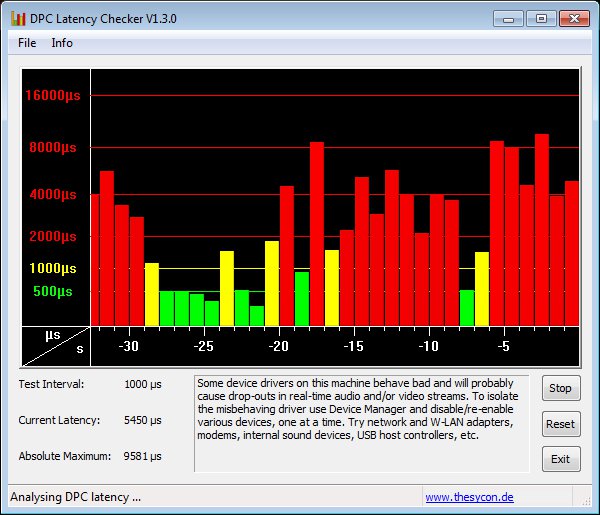
DPC issues are almost always caused by bad drivers or hardware conflicts. I first updated my video card drivers, motherboard drivers, audio drivers and NIC drivers; no improvement. I then removed all drivers, ran Driver Sweeper to remove all traces of the drivers, and re-installed them all over. No improvement. The next step being a hardware conflict, I disabled everything possible on my system via the BIOS. COM port, LPT port, floppy drive, Firewire, onboard audio, NIC - all went away. Again no improvement.
So now I'm getting rather stumped and annoyed. More google research turns up two more ideas: Some people have issues with ATI's PowerPlay feature. This power-saving driver feature will downclock the video card and memory when the GPU is idle. So I disabled it again without any improvement. As a final stab in the dark I started disabling everything on my system - services and running processes. Every non-microsoft service was disabled, and most of the Microsoft ones too! Down to complete bare-bones services. Additionally I uninstalled my firewall and antivirus software. No improvement.
I had about given up when I ran across this excellent post on how to find the actual driver involved with the DPC problems. Hope! I downloaded the Windows Performance Toolkit from the Windows SDK (just chose the 'Tools' part, uncheck everything else) and followed the steps listed to get a profile of what was going on during this high DPC latency.
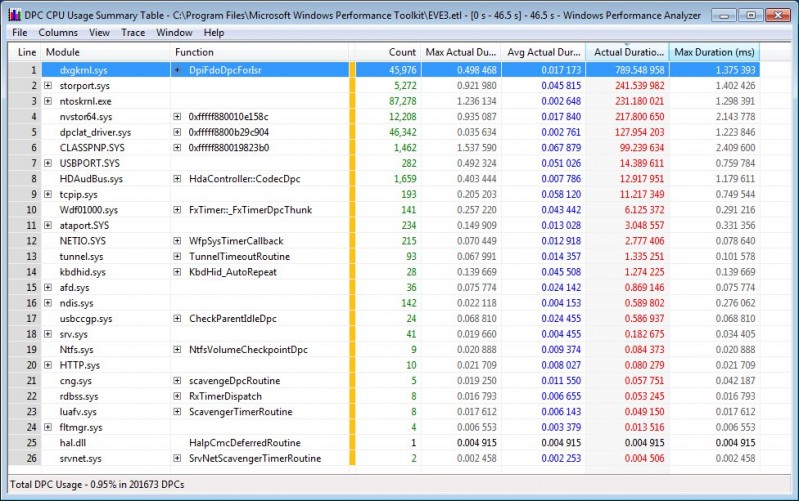
The driver in question turned out to be dxgkrnl.sys, the DirectX kernel driver. My DirectX is fully up to date. The DirectX diagnosis tool (dxdiag), also confirms everything is good. I am out of ideas - save one. I pull my old 9800GTX+ out of the box and install it, removing both ATI cards. Then I run the same latency-inducing setup:
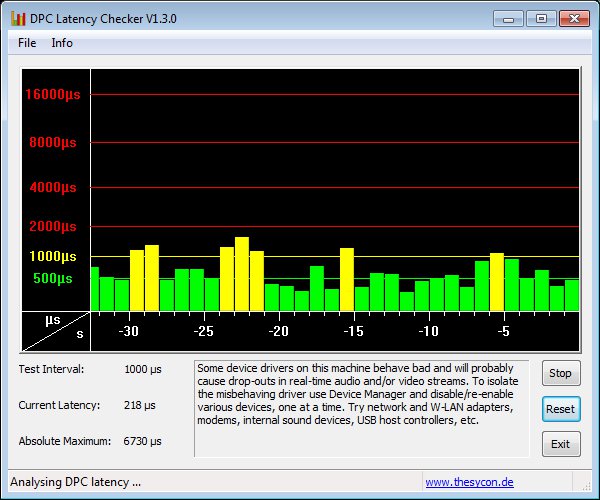
The latency isn't perfect, but it's a hell of a lot better than it was with the ATI cards!
Conclusion: ATI, your drivers suck.
Hope this helps some other poor soul with a bad-audio issue.
NVIDIA all the way, maing!
My--now somewhat "up there" agewise--HP MediaCentre m8125x uses a GEForce 7350LE, and I can run the client on medium-ish (Shaders/shadows on "Low", everything else medium, LOD medium or high, HDR and anti-aliasing off, interval default), and it's usually fine as long as I don't multi-client, which I hate doing anyway (only 1 monitor--that ALT-TAB lag will get you blown up sooner or later :|), and zoom out during larger fights.
I am however, looking to upgrade--need way more video memory to do EVE proper justice--any particular cards you'd recommend?
Cheers :)
If you're using and old 7000-series, you can't go wrong upgrading to a 9800-series card. They should be about $80-$100 now and will give you decent performance. Some of the GTX series cards might be better at the same price, but I haven't looked that closely.
Cool, thanks mate :)
It's probably because CCP, being in bed with NVIDIA, probably develops the game assuming everyone has NVIDIA cards and drivers.
It's not eve; it happens with other near-full-screen DirectX graphics too.
This is why I always buy nVidia (along with that they bought 3dfx ;)) as ATI drivers have always sucked for *every* OS, whereas nVidia's just work. ATI hardware is better, but without the drivers your hardware is next to useless.
I have a stock HP Pavilion running an ATI video card - not even sure of the model, something in the 4000s I think. I routinely run 6 clients set at 1024 x 768, in windowed mode. The client is set to optimize memory and I don't have any video or audio issues, even in places like Jita. The computer came with 4 GB of 6400/666 ram, and the only issues I had with Eve or the HP was when the RAM needed to dump data onto the hard drive. There would be a pause of 2 or 3 seconds, and that was about it, even though, I had a static virtual memory far exceeding the recommended size. All the drivers are up to date, but the biggest performance improvement came when I switched out to 8 GB of 6400/800 ram. Unfortunately, 8 gigs is max for the OEM board. The hard drive thrashing is all but gone and the rare client pauses are now less than 2 seconds, and that is only the active client.
Using the memory information app built into Vista, with 6 clients up, each client uses about 9 to 12% CPU, depending on how active it is, and each client uses 600 to 700MB of ram. I also usually have a Minecraft server up for my kids, plus Chrome, and often Evemon along with the 6 clients. More details:
http://thepointysticks.blogspot.com/2011/09/roids-and-smashing-them.html
If you're running in memory optimization mode, your quality settings are likely on the lower end; and with 1024x768 you'll be far better off than closer to full-screen.
I can run three clients in windowed mode, but not with high-quality settings and not at close to full screen resolution. This is when the DPC issues hit.
Yeah, I ran 3 clients in a modified settings version of "Optimized for Performance" setting. I had some of the settings tweaked for higher ship detail. The graphics were pretty good, but as I said somewhere else in my blog, while I like the look of the spaceships, the focus on information soon trumped the focus on graphics, at least for me. I ran three clients windowed, but just about maximized on my 24" screen. The HP has quad cores, and the machine cycles from running at 55% CPU up to the high 80's. Not sure why the CPU usage cycled like that, especially when the ships were basically static doing something like mining. Also, for some strange reason, the 3rd CPU is always more overtasked than the rest. I've used CPU balancing apps on games in the past, but it doesn't seem to be doing anything critical, performance wise, without it.
Maybe try the RAM route - it made a noticeable difference on mine. How much ram do you have? My friend is running 3 clients under XP and was doing it on 1 GB of ram with a decent video card (not sure of the make/model), but with some chop in video and audio at times, plus a lot of HD thrashing. With a BIO update, he upgraded to 4 GB of ram, but his board only recognizes about 3.5 GB (all the simms are ok though) and after installing the extra ram, just about all his problems disappeared, similar to my issues.
Good luck with it though.
PS - I tried Bitcoins too, and never had a single u/l or d/l even though all the blocks seemingly came in and it chugged along for 2 weeks.
I've got 8GB of RAM under Win7x64 (so I can use it all). Q8400, so it's got enough CPU.
I like the ATI cards (faster and coolerquieter at the price points I shop in ~$300) and hate the drivers. I have some old games which never leave my machines, that the whole family play together (eg. Age of Wonders: Shadow Magic). Some of these cannot be played using current ATI drivers, the same games run fine on another of the household machines under the latest nVidia drivers. No more ATI purchases for me I think.
That said, I can run 2x Eve clients, windowed and almost full-screen, on high settings with no audio issues, have never run a 3rd so cannot comment there.
I wonder if the card type is involved. What's your card? Also what are your high settings? I'm talking about turning all the quality items to "high" and antialising to at least "low" or better.
Dunno what is the problem on your end mate.
I run 2 clients all at high with AA at max, Winamp, KMPlayer and a crapload of other shit in background.
No problems with sound whatsoever. Also using ATI XFX HD 5770. I agree that no one on the face of the earth can fuck up drivers like Ati, they work but they make you smash your head on the wall until you manage to make them work right.
PC is, Gigabyte Ep45c-DS3R, 4gb ram, E6500, XFX HD 5770 + 2-3 HDDs, and Win7 x64 (no SP1).
http://imageshack.us/photo/my-images/560/unledzmz.jpg
Strange thing is that your system works fine with nV card, but Ati fucks it up. Did ya try a clean win install? Or those cards on another PC?
Unfortunately I don't have another system to test it on. I also tried under a Win7x32 install I have on the same computer, with similar issues.
I use a pair of 6850's in CrossFire and the entire setup is flawless in every respect. However my buddy had a 460 die on him, so that must mean all Nvidia cards are trash.
Because clearly the graphic cards are the same?
Go do as much debugging as I did and you'll actually have a valid reason to comment.
I had DPC issues on an old computer with terrible hardware many years ago. It was funny stuff, and mostly seemed to cause spikes when simply using the keyboard. I ended up replacing the whole thing because it was such a piece of junk.
The problem here less likely has to do with AMD/ATI sucking, and more to do with the fact that you're running two mid-low end cards in Crossfire in a fairly demanding environment. Multi-GPU setups are notoriously problematic (both for AMD and nVidia), and this is one of many issues that can arise. I would bet that if you ran the HD5770 by itself you would have similar DPC results to the 9800GTX. I could be wrong in this case, but in general I'd recommend going for higher end single GPU setups, they have far less issues.
Kel'airy: My setup did not actually use Crossfire. The 5750 and 5770 ran as independent cards. I also tried with only the 5770 installed and had the same problems.
The nVidia card had distinctly less issues with all other factors accounted for.